
Free
Your Excel export isn't client-ready. Again.
Upload your spreadsheet.Get a PDF you can actually send.
Skip the cleanup. No more cut-off columns, awkward page breaks,
or manual fixes before every send.
3 free exports. No account needed. Packs from $19.

Used by
ConsultantsFinance teamsAuditorsSaaS reporting toolsOperations teamsConsultantsFinance teamsAuditorsSaaS reporting toolsOperations teams
Used by
ConsultantsFinance teamsAuditorsSaaS reporting toolsOperations teamsConsultantsFinance teamsAuditorsSaaS reporting toolsOperations teams
See how fitforpdf transforms your file.
Typical sources: Excel exports · CSV datasets · SaaS reports
Typically saves 30 to 45 min per export
Explore how your table is automatically structured
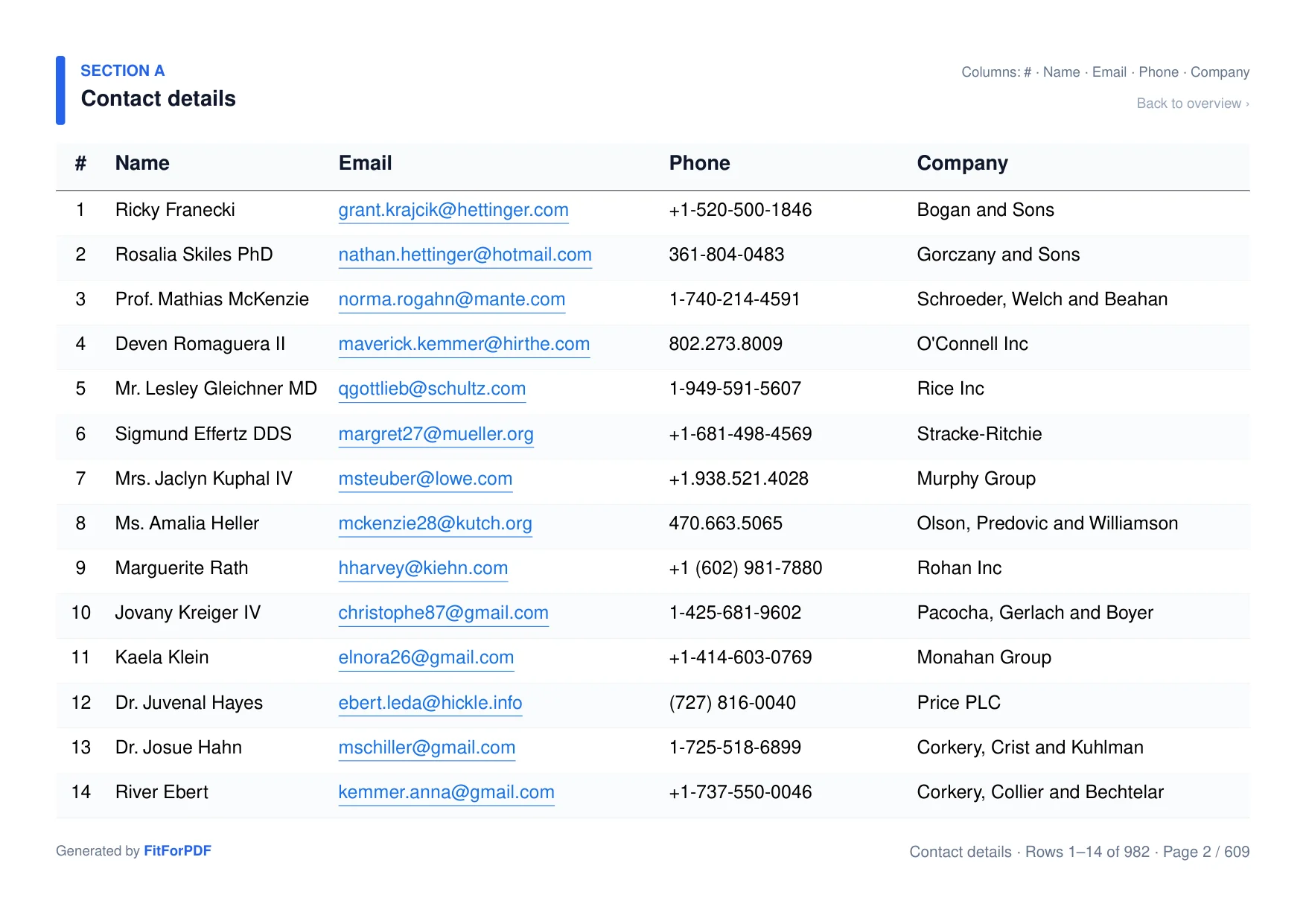
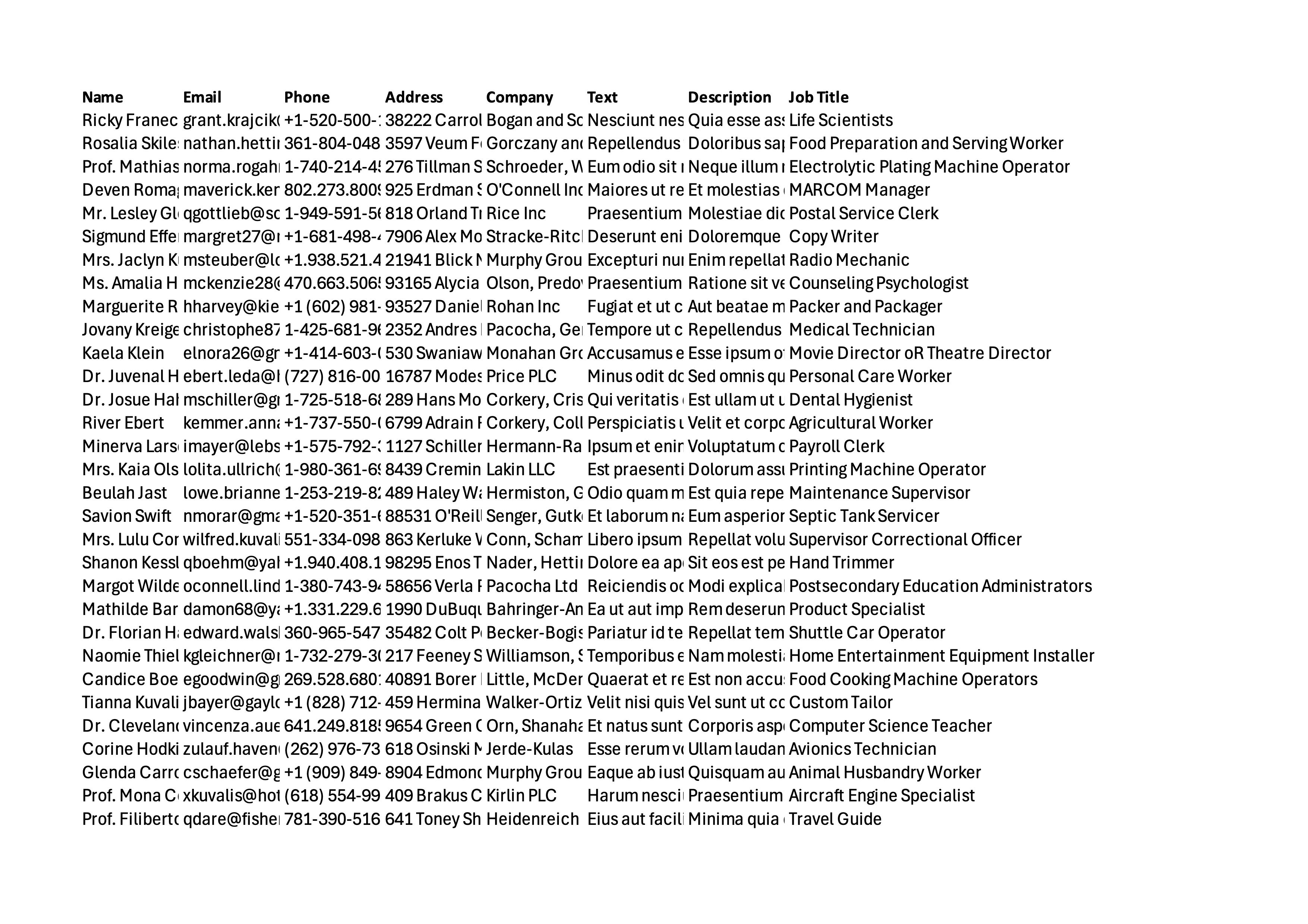
Source spreadsheet
Client-ready PDF
9 columns. Automatically split into 5 readable sections.
Drag to compare
Overview page
Columns grouped into readable sections
Key columns repeated automatically
Clear page numbers and row ranges
Section names generated automatically
No manual work — jump to any section
Works with: CRM exports · financial reports · analytics tables · SaaS data exports
Trusted by teams worldwide
What people say
“We stopped fixing Excel exports manually. This saved us hours every week.”
Head of Operations
B2B SaaS — CRM exports, 20+ columns
“Our CRM export has 28 columns. fitforpdf turns it into something I can actually send to clients.”
Account Manager
B2B SaaS — HubSpot/Salesforce exports
“I used to spend 45 minutes reformatting every quarterly report. Now it takes 10 seconds.”
Senior Auditor
Big 4 advisory — quarterly compliance reports
“We stopped fixing Excel exports manually. This saved us hours every week.”
Head of Operations
B2B SaaS — CRM exports, 20+ columns
“Our CRM export has 28 columns. fitforpdf turns it into something I can actually send to clients.”
Account Manager
B2B SaaS — HubSpot/Salesforce exports
“I used to spend 45 minutes reformatting every quarterly report. Now it takes 10 seconds.”
Senior Auditor
Big 4 advisory — quarterly compliance reports
Three steps. Done.
1
Upload your file
30+ columns, CRM exports, financial reports. Use the file you already have.
2
Structured sections, automatically
Wide columns grouped. Headers repeated. Pages numbered. No manual work.
3
Ready to send
A PDF your client can read, review, and act on. In seconds, not hours.
Try it free3 free exports. Packs from $19.
Saves 45 min of manual formatting per export.
No subscription. Credits never expire.
Most popular
One-time payment
Starter
$1910 exports
$1.90 per export
For freelancers and regular client work.
- 10 PDF exports
- No fitforpdf watermark
- Standard structured layout
- Never expires
One-time payment
Volume
$79100 exports
$0.79 per export
For consultants and recurring reporting.
- 100 PDF exports
- No fitforpdf watermark
- Standard structured layout
- Never expires
One-time payment
Single
$4.901 export
For one urgent export.
- 1 PDF export
- No fitforpdf watermark
- Standard structured layout
- Never expires
Need higher volume, API access, or team plans? Contact us.
Just want to test the waters?
3 free exports. fitforpdf watermark included. No account needed.
Upload a file for free →Have a promo code?
APIExplore the docs
Integrate in minutes
One API call. CSV or XLSX in, readable PDF out.
Terminal
# Convert a CSV or XLSX file to a readable PDFcurl -X POST https://api.fitforpdf.com/v1/render \ -H "X-FITFORPDF-KEY: $API_KEY" \ -F "file=@customers.csv" \ -o output.pdf200 OKapplication/pdf
// Response
# → output.pdf saved (2 pages, 184 KB)## Response headers:# Content-Type: application/pdf# X-Plan: credits# X-Credits-Remaining: 4# X-CleanSheet-Score: 92Excel PDF Export vs fitforpdf
Stop fighting print settings. Get a presentable structured PDF in seconds.
Wide columns
✗Cut off or unreadable
✓Grouped into sections
Layout
✗Manual configuration
✓Auto-structured
Page breaks
✗Unpredictable splits
✓Automatic pagination
Reference columns
✗Lost after first pages
✓Repeated automatically
Overview
✗None
✓Navigate between sections instantly
Result
✗Spreadsheet-like output
✓Client-ready document
| Feature | Excel PDF Export | fitforpdf |
|---|---|---|
| Wide columns | ✗Cut off or unreadable | ✓Grouped into sections |
| Layout | ✗Manual configuration | ✓Auto-structured |
| Page breaks | ✗Unpredictable splits | ✓Automatic pagination |
| Reference columns | ✗Lost after first pages | ✓Repeated automatically |
| Overview | ✗None | ✓Navigate between sections instantly |
| Result | ✗Spreadsheet-like output | ✓Client-ready document |
Built for real workflows
From quarterly audits to automated SaaS exports.
Frequently asked questions
Most users spend 20 to 45 minutes fixing each export. fitforpdf reduces that to seconds.
Yes. Even one export can take 30 minutes to fix manually. A single clean PDF often pays for itself.
You can, but it's repetitive, fragile, and time-consuming. fitforpdf removes that step entirely.
No. Upload the file you already have.
Excel and CSV files.
Both. Use the app for quick fixes, the API for automation.
Yes. Open →
No. Files are deleted immediately after conversion. The generated PDF is available for up to 15 minutes.

Your export is done.
The cleanup shouldn't be.
Upload your Excel or CSV and get a PDF that is structured, readable, and ready to send.